
Website Accessibility for Visual Disabilities

Visual disabilities are among the most common disability types affecting how people use the web, and they take several distinct forms, including blindness, low vision, and color blindness. Each one changes how a person perceives and interacts with a website, and each requires different accommodations to ensure equal access. Understanding ADA requirements for blind and low vision users is the first step toward building a website that works for everyone, not just for sighted users navigating with a mouse.

How Visual Disabilities Affect Website Use
Each type of visual disability changes the way a person interacts with a website in a different way. Someone who is blind relies entirely on non-visual methods to understand and navigate a page, typically through a screen reader that converts on-screen content into speech or braille output. People with low vision may retain some sight but need significant magnification, high contrast, or larger text to read comfortably. Color blindness does not affect the ability to see content, but it does affect how that content is interpreted, particularly when meaning is conveyed through color alone.
For all three groups, a website’s usability depends less on how it looks and more on how well its underlying structure and content are built. A visually polished site can still be completely unusable if it was not designed with these interaction methods in mind.
Common Accessibility Barriers on Websites
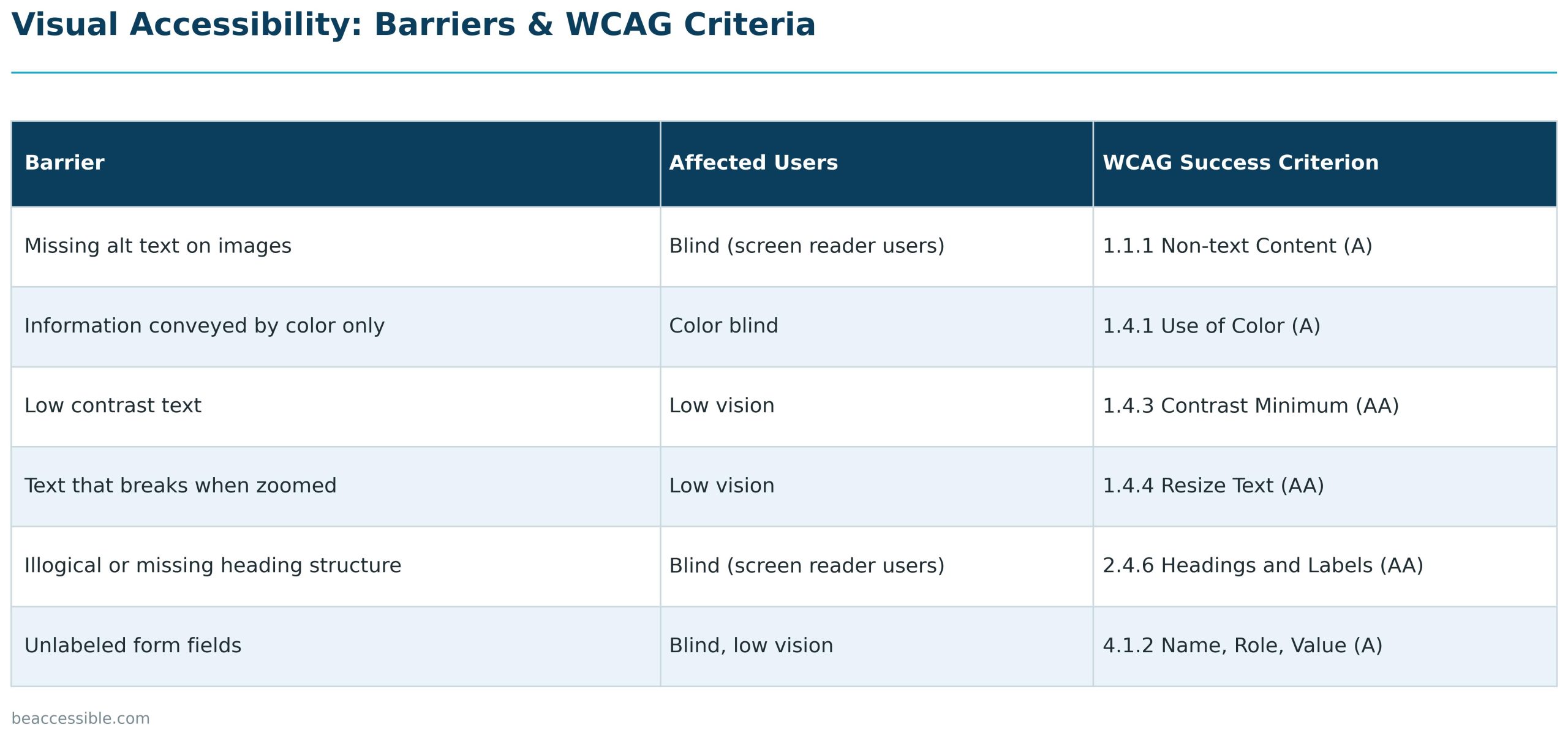
Several recurring issues make websites difficult or impossible to use for people with visual disabilities:
- Missing or unhelpful alt text. Images without descriptive alternative text are invisible to screen reader users, who lose the information the image was meant to convey.
- Poor color contrast. Text that lacks sufficient contrast against its background is hard or impossible to read for users with low vision.
- Color-dependent information. Using red text alone to indicate an error, or color alone to distinguish a required form field, excludes users with color blindness who cannot perceive that distinction.
- Inconsistent or missing heading structure. Screen reader users often navigate by jumping between headings rather than reading a page top to bottom. Without a logical heading hierarchy, this navigation method breaks down.
- Non-resizable text. Pages that break or become unusable when zoomed or when text size is increased create real barriers for low vision users.
- Inaccessible forms. Form fields without properly associated labels are difficult for screen reader users to complete accurately.
Assistive Technologies Used
People with visual disabilities rely on a range of assistive technologies to access websites:
- Screen readers such as JAWS, NVDA, and VoiceOver read page content aloud or output it to a braille display, but they can only do this accurately if the underlying website has clean HTML structure, proper alt text, and correctly labeled elements.
- Screen magnification software enlarges portions of the screen for users with low vision, which requires that layouts remain usable and readable at high zoom levels.
- Browser and OS-level zoom is used to increase text size without additional software, and depends on responsive, flexible page design.
- High contrast and custom color modes are used by both low vision and color blind users to adjust how content is displayed for easier reading.
Make Your Website Accessible for Blind and Low Vision Users
Be Accessible offers manual website accessibility audits designed to identify exactly where blind and low vision users encounter barriers, from missing alt text and poor color contrast to broken screen reader navigation. Our audits include real testing with assistive technologies like JAWS, NVDA, and VoiceOver, so nothing gets missed due to guesswork or automated shortcuts.
This hands-on approach is what sets a genuine ADA website compliance review apart from a surface-level scan. We also provide document accessibility and PDF remediation to ensure downloadable content is just as accessible to screen reader users as your website itself.
Frequently Asked Questions
What WCAG success criteria apply to blind and low vision users?
Several WCAG 2.2 success criteria directly address blind and low vision access, including 1.1.1 Non-text Content, which requires text alternatives for images, 1.4.3 Contrast Minimum, which sets required contrast ratios between text and background, and 1.4.4 Resize Text, which requires that text can be enlarged up to 200% without breaking the layout. Meeting these criteria at Level AA is the standard most commonly referenced in ADA website compliance assessments.
Is my website legally required to be accessible to blind users?
Businesses open to the public are generally subject to ADA Title III, which courts have increasingly interpreted to apply to websites, and government entities are subject to ADA Title II and Section 508. While the ADA itself does not name a specific technical standard, WCAG 2.1 or 2.2 Level AA is the benchmark most consistently cited in lawsuits, settlements, and DOJ guidance for demonstrating accessibility to blind and low vision users.
Can automated scanning tools detect all barriers for blind users?
Automated scanning tools can catch a portion of issues, such as missing alt attributes, but they cannot reliably detect whether alt text is actually descriptive, whether a screen reader announces content in a logical order, or whether keyboard navigation works as expected. A manual audit that includes real testing with screen readers like JAWS, NVDA, and VoiceOver is necessary to catch the barriers automated tools miss.
What is the difference between accessibility for blind users and low vision users?
Blind users typically rely entirely on screen readers and non-visual navigation, which depends on clean code structure, alt text, and proper labeling. Low vision users retain some sight but need magnification, larger text, or high contrast to use a site comfortably, which depends more on flexible, responsive layout design. A website can meet one group’s needs while still failing the other, so both require distinct testing.
Does color blindness require the same fixes as blindness or low vision?
No. Color blindness does not affect a person’s ability to see content, only how color is perceived, so the primary fix is ensuring that information is never conveyed by color alone, per WCAG 1.4.1 Use of Color. This is a simpler, more targeted fix than the structural and assistive technology considerations required for blind and low vision users.
How do I know if my website works with a screen reader?
The most reliable way to know is manual testing with an actual screen reader, since automated scans cannot evaluate reading order, alt text quality, or whether interactive elements are properly announced. A professional accessibility audit that includes screen reader testing is the most accurate way to identify these gaps before they result in a complaint or legal exposure.

Contact Us
Please complete all fields.
Recent Posts
UK Accessibility Law and Website Accessibility Compliance
UK website accessibility law works through two main pieces of legislation, and they apply to different organisations in different ways. The Equality Act 2010 sets a general duty for both public and private sector service providers. The Public Sector Bodies (Websites and Mobile Applications) Accessibility Regulations 2018 adds a stricter, […]

Website Accessibility for Auditory Disabilities
Deafness and hearing loss affect how people access content delivered through sound, but the experience varies. Someone in the Deaf community may communicate primarily in American Sign Language, a distinct language with its own grammar, not a signed version of English. Someone who is hard of hearing may rely more […]
Website Accessibility for Motor Disabilities
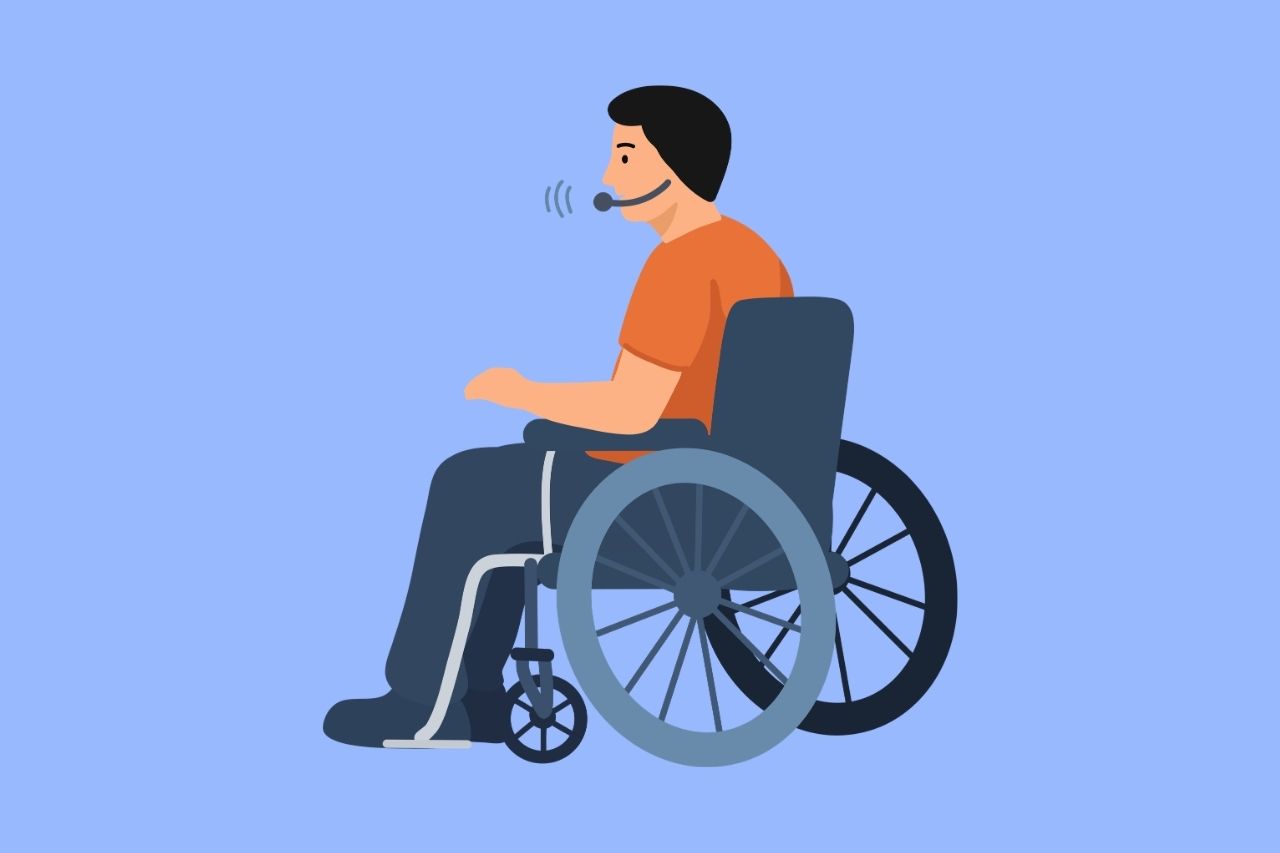
Motor disabilities affect a person’s ability to control or coordinate physical movement, and they take many forms, including limited mobility, tremor, paralysis, and reduced use of one hand or side of the body. These conditions can be present from birth or result from injury, illness, or age-related changes. What they […]